Pinned News New

Reserve the Clubhouse Online!

Neighbors, you can now reserve the clubhouse right here on rivershoals.org. Pick your date, pay online, and your receipt and door code come straight to you. No phone calls, no paper contract, no waiting on a callback. Birthday parties, baby showers, graduation get-togethers, the holiday gathering that outgrew your living room: the clubhouse is ready when you are.

🗺 Here’s how it works
1. Sign in, tap Clubhouseon your Owners Menu2. Pick an open datefree days show on the calendar3. Tell us about the eventtype, guests, agree to the terms4. Pay onlinerental fee + refundable depositcard, Apple Pay or Google Pay5. Receipt by emailright away, kept on the page6. Door code arrivesa few days before, by email7. Enjoy it, leave it tidythe Board checks the room,your deposit comes backDues past due?settle your balancein My Account firstPlans change?press Cancel; therefund shows first
Reserving the clubhouse online, start to finish. Dashed notes are the side roads: past-due dues stop a booking until the balance is settled, and a cancel can be made any time from Your bookings. The door code is shown only once the lock has it.

The same steps in words:

  1. Sign in and tap Clubhouse on your Owners Menu.
  2. Pick an open date on the calendar. Days that are already taken are marked, so you can see what’s free at a glance.
  3. Tell us about your event (the kind of event and about how many guests) and agree to the clubhouse terms.
  4. Pay online. The rental fee and the refundable security deposit are paid together, by card, Apple Pay or Google Pay. Payments are handled by Stripe, so the Association never sees or stores your card number.
  5. Your receipt lands in your email right away. It’s your confirmation, and it stays on the Clubhouse page under Your bookings.
  6. Your door code arrives a few days before your date, on the page and by email. The clubhouse uses a digital lock, so there’s no key to pick up or return.
  7. Enjoy it, leave it tidy, and lock up. Once the room has been checked, your deposit comes back to you.
📝 Good to know
  • Who can book: River Shoals owners whose account is in good standing. If your dues are past due, the Clubhouse page will tell you, and you can book as soon as the balance is settled. A tenant may book with the owner’s written permission. The person booking must be at least 21 and stay for the whole event.
  • Hours: 8 AM to 9 PM, and 8 AM to 7 PM on Sundays. Setup and cleanup happen inside that window.
  • Cost: the current rental fee and deposit are posted on the Clubhouse page, and the price summary shows exactly what you’ll pay and what comes back before you press the button.
  • Damage: the deposit covers repairs, extra cleaning and anything that needs replacing. If the cost is more than the deposit, the renter covers the difference, so please treat the place like your own living room.
  • Plans change? Press Cancel on your booking. The page shows what comes back before you confirm, and the deposit is refunded in full.
  • The pool is not part of the rental. It stays closed and locked during clubhouse events. The playground is fair game, with a grown-up watching.
👉 Ready to book?

Head to rivershoals.org/owners/clubhouse.php, or sign in and tap Clubhouse on your Owners Menu. The page is made for your phone as much as your computer, and there’s a ? in the top bar that walks you through it any time. Stuck, or something looks off? Use Ask the HOA and a real person from the Board will get back to you.

Thank you to every neighbor who waited patiently while we got this right. Go plan something wonderful. 🎉

Pinned Event

POSTPONED!!! FALL COMMUNITY YARD SALE

Due to inclement weather, the community yard sale has been moved to 10/17.
Flyer for POSTPONED!!! FALL COMMUNITY YARD SALE
News New

Gate Remotes and Pool Fobs, Now Delivered Right to Your Door

Good news, neighbors! You can now order gate remotes and pool fobs online at rivershoals.org. No more tracking anybody down, swapping cash, or waiting on a callback. Order from your couch and we’ll bring it to you.

How it works

Sign in at rivershoals.org and open the Owners menu.
Choose Order a Fob or Remote.
Pick what you need and pay online with a card, Apple Pay or Google Pay.
Our Keymaster gets your order and delivers it to your home.

What’s available

Pool fob: $25. One per order. If you’re replacing a lost fob, the old one gets turned off when the new one is set up, so nobody else can use it.
Gate remote: $50 each. Order one for each car, up to four per order. If you need more than that, just send us a note.

The price you see is the price you pay. The HOA covers the card processing fee.

Before you order

Make sure your name and address are up to date under Account. That’s where we deliver. If you need to tell us something for the drop off (side door, leave it with a neighbor, that kind of thing), there’s a notes box on the order form.

One note: the old gate RFID tags (the stickers) aren’t offered anymore, because the gate reader can’t scan them. The remote is the way to go.

Questions? Use Ask a Question on the site and we’ll get back to you.

See you at the pool!

Your River Shoals HOA Board
News New

Every Street Light in River Shoals, Now on One Map

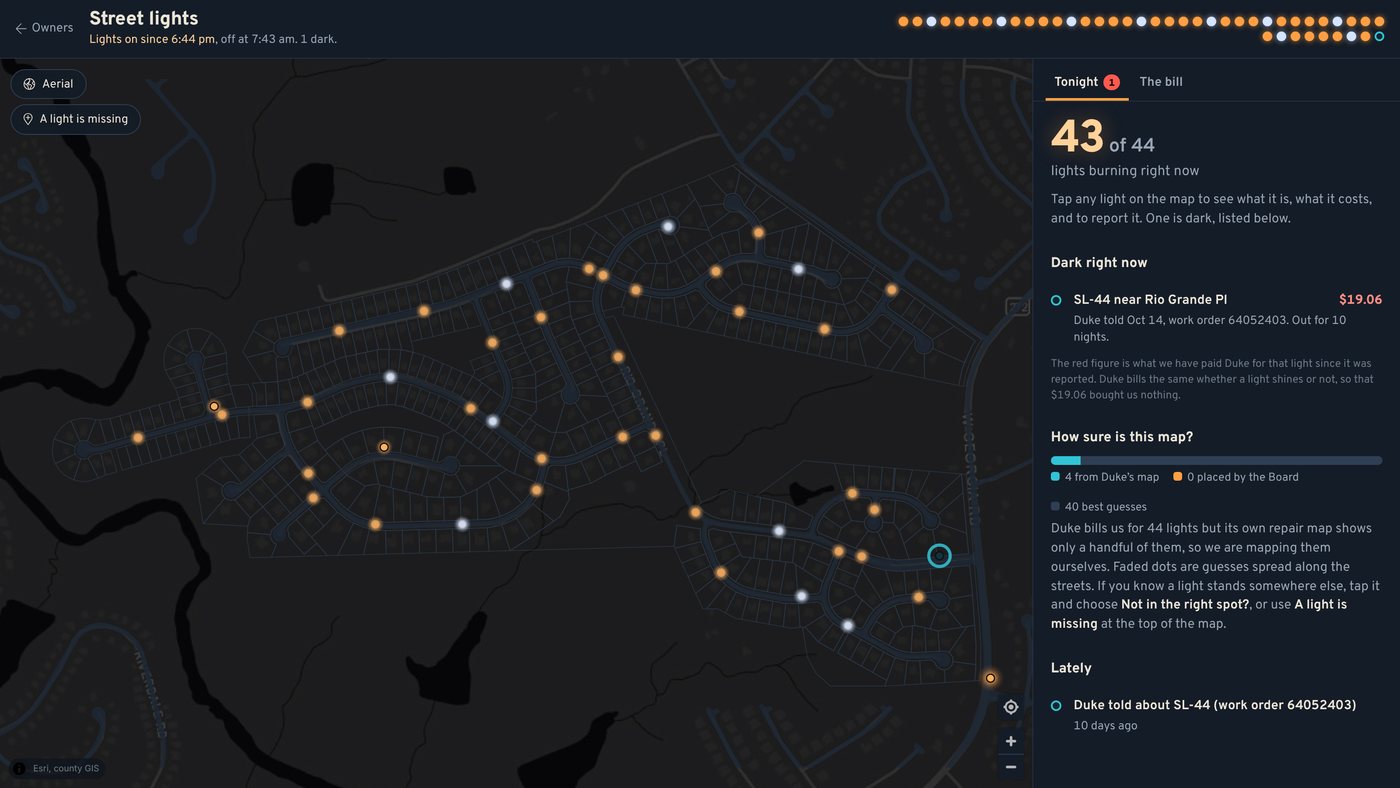
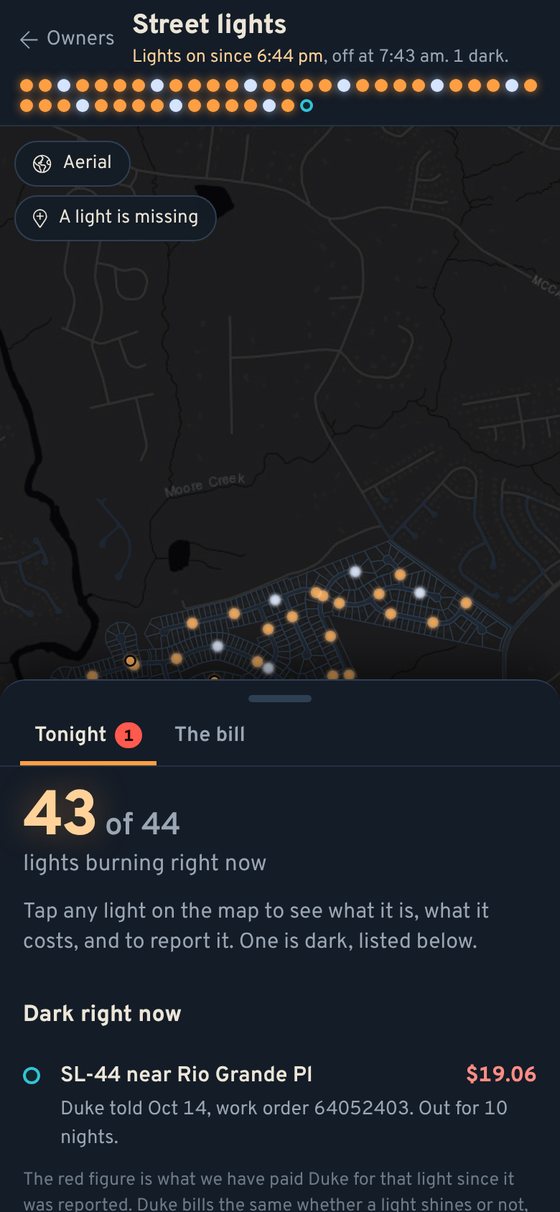
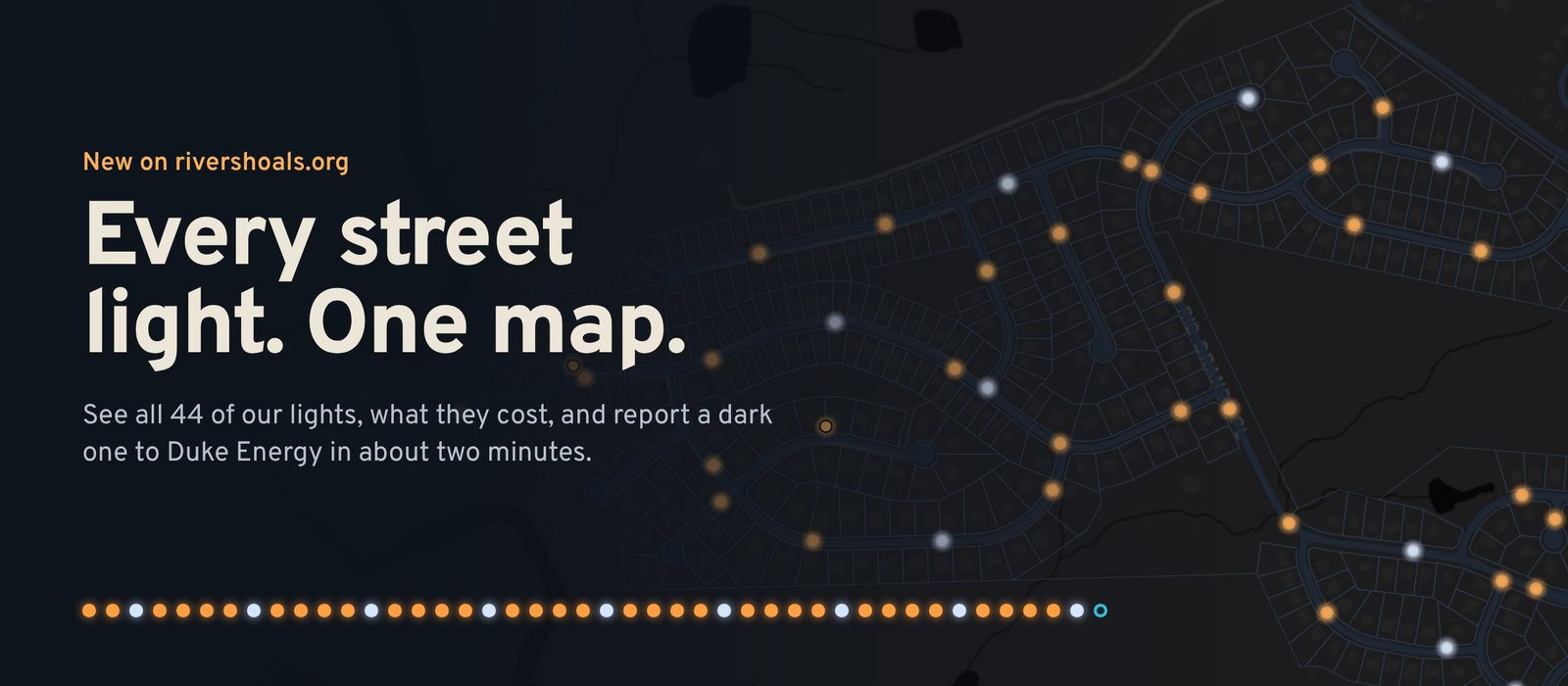
The River Shoals street light map at night, every light glowing in its real color

Neighbors, every street light in River Shoals now lives on one map. Open the Owners menu, press Street Lights, and there they are: all 44 lights we rent from Duke Energy, glowing in the color they really shine. Tap one to see what it is and what it costs. If it’s dark, you can report it and get it to Duke in about two minutes.

💡 Why bother? Because we pay for every one of them, lit or not

The lights belong to Duke. The HOA rents them, and that rent is one of our biggest bills: about $2,543 a month, a little over $30,000 a year, or about $5.75 a month from every home. Duke charges the same flat rate whether a light is burning or not, so a dark light still costs us about $1.90 a day and gives us nothing for it. The sooner Duke hears about it, the sooner we’re getting what we pay for.

🌙 What you’ll see

The night map: orange sodium lights and white metal halide lights along our streets, with one dark light circled in teal

Each dot is a light. Orange ones are high pressure sodium (the warm glow most of our acorn lights give off); white ones are metal halide. A red ring means a neighbor has reported it, and a teal ring means Duke has been told and it’s waiting on them. The row of dots along the top is every light at a glance. The page even knows when the lights come on tonight and go off in the morning.

⏰ Report a dark light in two minutes

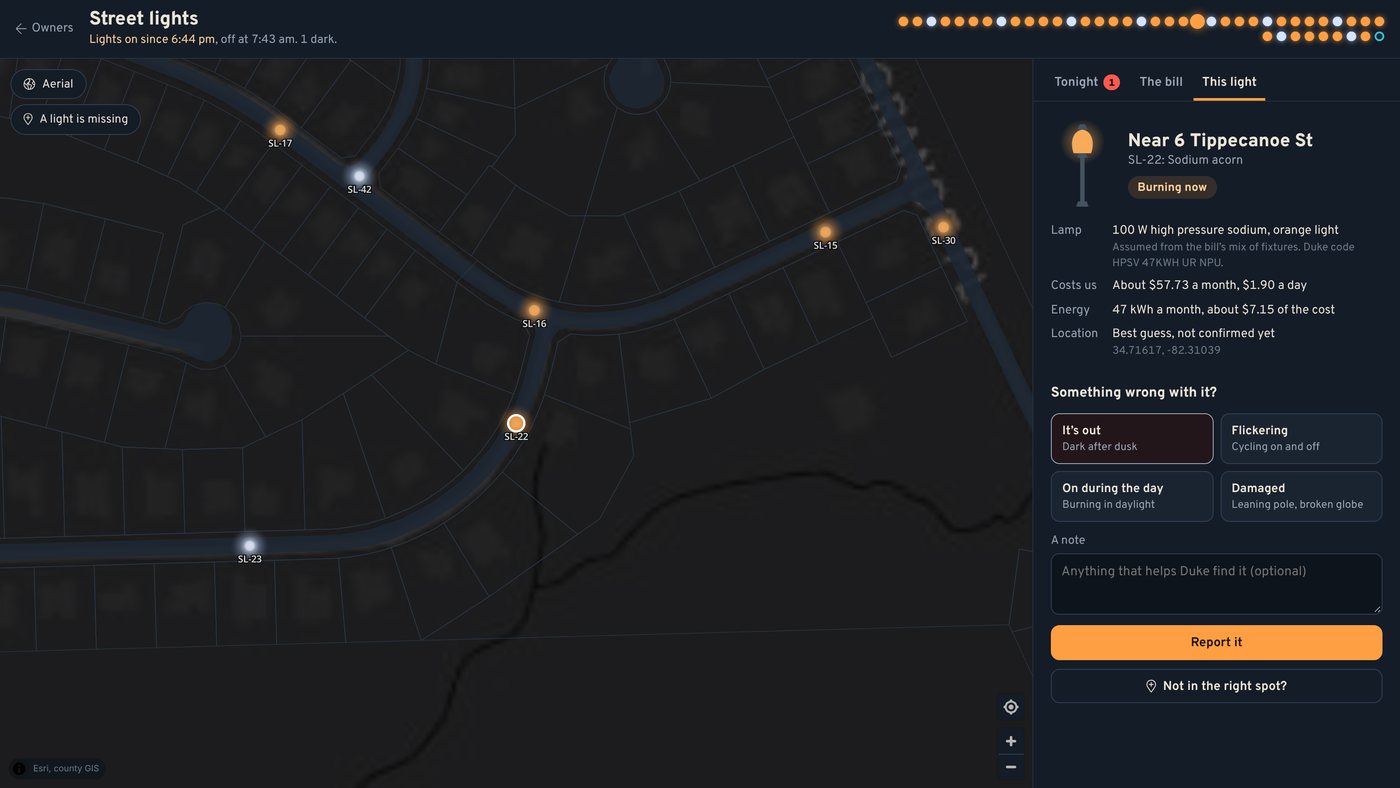
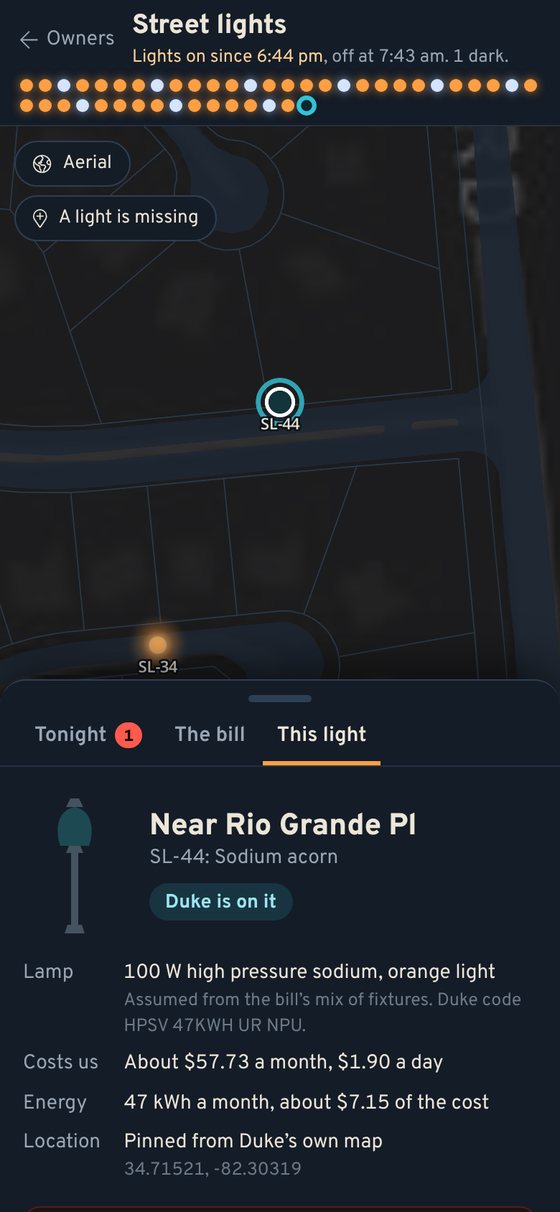
Tapping a light shows where it is, what kind it is, what it costs, and buttons to report it out, flickering, on in daylight or damaged

  1. Tap the light on the map. You’ll see the nearest house, the kind of lamp, and what it costs us.
  2. Choose It’s out (or Flickering, On during the day, Damaged) and press Report it.
  3. Press Copy the details, then Open Duke’s repair map. Search the address the page gives you, request service, and paste. Everything Duke asks for is already written out, down to the GPS spot.
  4. Come back and press I told Duke. Add Duke’s work order number if they gave you one.

That last step is the neighborly part. Once anyone tells Duke, the light shows it, so the next person walking the dog doesn’t have to report it all over again. If a neighbor already reported it, pressing I see it too adds your name instead of starting a second report. When it’s fixed, anyone can press It’s back on.

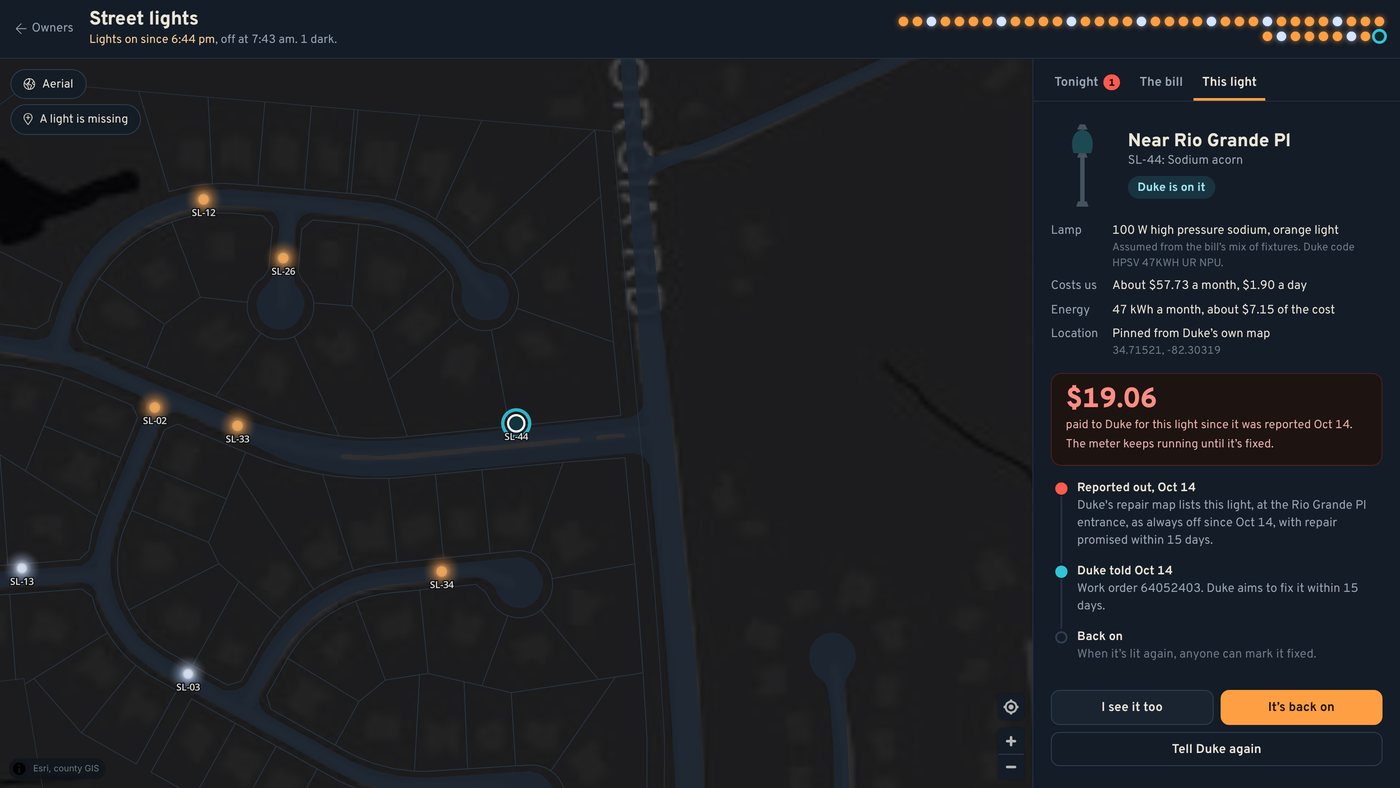
A light Duke is working on: the meter shows what we have paid for it since it went dark, with the reported, told Duke and back on steps

Case in point: the light at the Rio Grande Place entrance has been dark since October 14. Duke has it on a work order (number 64052403) with a promise to fix it within 15 days. The page keeps a running meter of what we’ve paid Duke for that light since it went dark. If Duke misses its 15 days, the page says so and makes it easy to nudge them again.

💰 Where the money actually goes

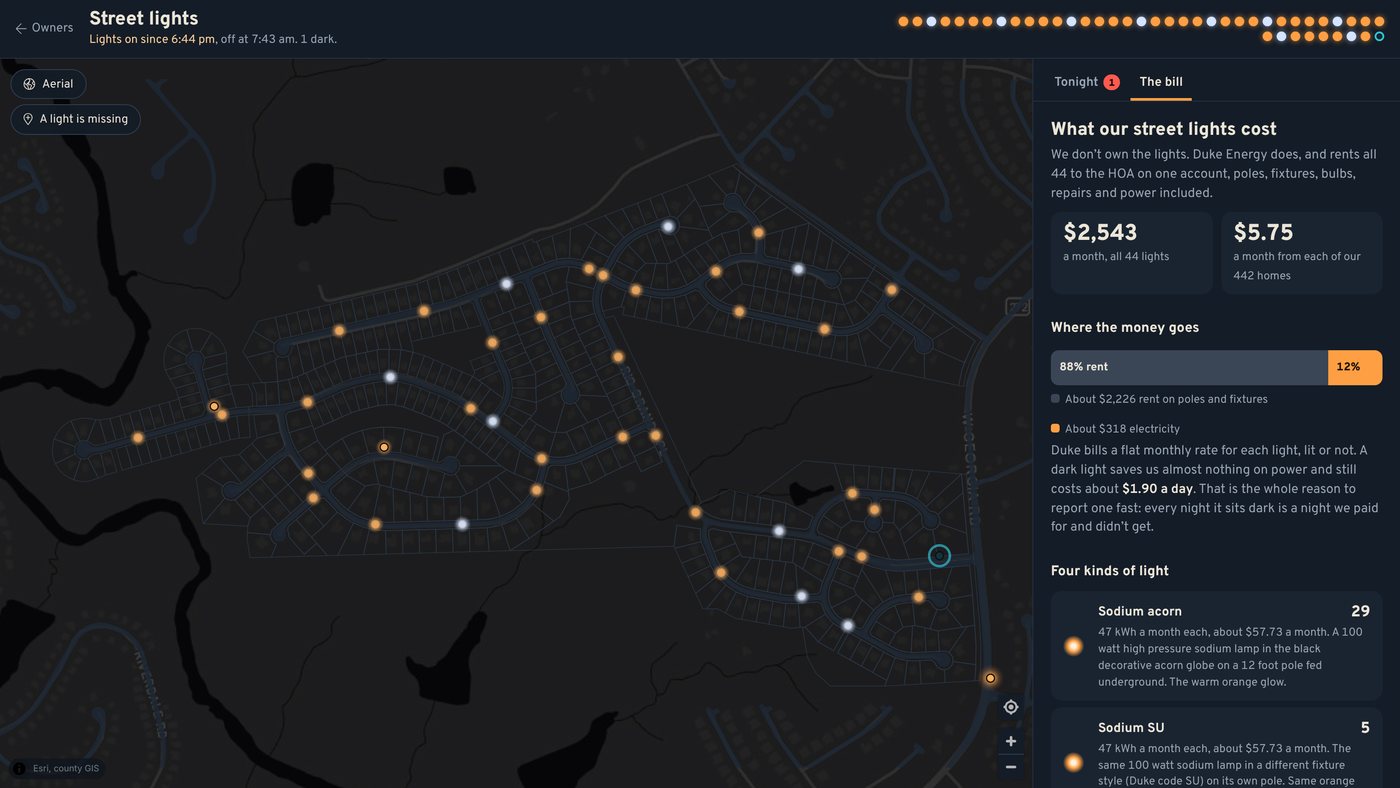
The bill tab: about 88 percent of the street light bill is rent on poles and fixtures, about 12 percent is electricity

The The bill tab breaks it down from Duke’s own August bill. Here’s the surprise: only about 12% of the street light bill is electricity. The other 88% is rent on the poles, fixtures and upkeep. All 44 lights together use about 2,089 kWh a month, roughly what two homes use. You’ll also find the four kinds of light we have (29 sodium acorns, 5 sodium lights in a different fixture, 9 metal halide and one big 250 watt sodium head), and a little “What if Duke switched them to LED?” slider so you can see what that would and wouldn’t save.

🧭 Help us finish the map

Here’s something we learned building this: Duke’s own repair map only shows about four of our 44 lights. So we’re making our own. Lights pinned from Duke’s map are exact; the rest start as faded dots, our best guess along each street, and the Board is placing them pole by pole. You can help: if a light on the map isn’t where you know it stands, tap it and press Not in the right spot?, then tap where it really is. If there’s a light the map is missing, press A light is missing at the top of the map. The Board checks every suggestion and updates the map.

📱 Made for your phone

The street light map on an iPhoneOne light's details on an iPhone

Spot a dark light on your evening walk? Pull it up right there on the sidewalk. The details slide up from the bottom, and the map stays in view.

👉 Go take a look

Sign in at rivershoals.org and press Street Lights on the Owners menu, or go straight to the street light map. Step by step instructions are in the owner’s manual. A downed line or a pole across the road is an emergency: call Duke at 800.769.3766, or 911.

Thanks for keeping an eye on our streets, neighbors. A well lit River Shoals is a safer one, and now it’s easier than ever to keep it that way. 🌟

Event

Fall yard sale postponed

When: Sat, Oct 17 · 7:00am to 12:00pm
Where: Community wide

Tell us you're coming on the Social Committee page in the owners area.
Flyer for Fall yard sale postponed
Event

Community Yard Sale, Saturday October 10

River Shoals is having a neighborhood-wide yard sale on Saturday, [October 10], from 7am to noon!

Want to sell? Just set up in your own driveway that morning. No sign-up needed.
The Social Committee will put signs up at the entrances and spread the word.

A lot of you on Facebook have requested a community yard sale! It’s a little bit too late to do it October 3, but we can try and get this together for October 10! Hopefully this will give us some time to advertise and get the signs posted.
News

Fall Has Arrived in River Shoals! 🍂

Well, y'all, we made it! The mornings are finally cool enough for a cup of coffee on the porch, the maples along the creek are starting to show off, and somebody on the street has already put out a pumpkin or three. Fall in River Shoals is here, and we couldn't be happier to welcome it.

What's New on the Website

We've been busy behind the scenes making rivershoals.org more useful for every household:

Clubhouse reservations online. Check availability and book the clubhouse right from the owners portal. No phone tag required.
Community calendar. Neighborhood events, meetings and important dates all in one place.
Pool duty reminders. Pool volunteers now get a friendly email heads-up a week before and the day before their weekend.
Stronger account security. Optional two-factor sign-in keeps your account safe.
One easy inbox for questions. Email support@rivershoals.org and your question goes straight to the right person.
Coming soon: text message alerts for the important stuff, like pool closings, gate issues and weather updates.

Don't have an account yet? Now's a great time to sign up! It only takes a couple of minutes, and it's the best way to stay in the loop.

We Need You!

River Shoals is only as great as the neighbors who pitch in, and we'd love a few more hands. Whether you have an hour a month or a weekend here and there, there's a spot for you:

Welcome Committee: help greet new neighbors and make them feel at home
Social Committee: help plan get-togethers, holiday fun and community events
Pool Committee: help keep our favorite summer spot running smoothly
Architectural Review (ARC): lend a thoughtful eye to home improvement requests

Interested? Just reach out to any board member or email support@rivershoals.org. No experience needed, just a neighborly spirit!

Happy Autumn, River Shoals!

From all of us on the board, we hope your fall is full of football Saturdays, porch conversations, crisp evening walks, and maybe a slice of pie or two. Thank you for making this such a wonderful place to call home.

See y'all around the neighborhood!

The River Shoals HOA Board of Directors
News

Community Management Transition

Effective October 1, 2026, River Shoals Homeowners Association will be managed by IPM HOA Management, an Associa company. Greenville HOA Services will conclude its management of the community on September 30, 2026.

IPM brings a 24 hour resident response system, a homeowner portal with online architectural request submission, monthly property inspections, and monthly attendance at board meetings. The board retains its existing legal counsel and full control of association funds.

Homeowners do not need to take any action at this time. Instructions for accessing the new homeowner portal and for assessment payments will be posted here and sent by email before October 1.

Direct questions about the transition to the board at support@rivershoals.org
News

Welcome to the New RiverShoals.org!

Neighbors, welcome to the brand-new RiverShoals.org! Over the past months, your community website has quietly grown from a simple info page into a full owner’s portal — a place that knows you, works from your phone, and puts everything about living in River Shoals one tap away. Here’s a tour of what’s new.

🏠 A front door that knows you

Sign in once, check “Keep me signed in,” and from then on rivershoals.org takes you straight to your own owner’s page — no more wandering through the public site. And that page is genuinely yours: it greets you by name with an aerial photo of your own house as the backdrop, your profile picture, and a smart little strip that shows only what matters to you — the status of your ARC request, your pool-duty weekend, the next community event. More personalization (your own photos, custom backgrounds) is on the way.

💰 Your account, finally crystal clear

The My Account page now shows your household’s full picture at a glance: your dues status front and center, your complete statement history, and any notices that need your attention. If everything’s paid up, you’ll see a friendly green “in good standing — thank you!” If something’s outstanding, you’ll see exactly what and why — no surprises, no guessing. The board can also record approved payment plans right in the system, so anyone working through a balance is treated fairly and their access reflects it. Online dues payment by card is in final testing and coming soon — for now, please keep paying by check as usual.

🛠 Home projects without the paperwork

Planning a fence, a paint refresh, a deck? The ARC request now lives entirely online, and it’s honestly kind of fun: the form shows you the aerial photo of your property, and you can zoom in and draw right on it — circle the spot, sketch the fence line — then snap photos with your phone and attach them on the spot. You’ll get an email confirming receipt, you can track the committee’s review from “My ARC Requests” (with the 45-day response clock counting down in your favor), and photos now display right on the request so everyone’s literally looking at the same picture.

🏊 The pool, the clubhouse, and the good stuff

The clubhouse page has the full rental rundown — rates, the checklist, and the correct hours (7am–11pm, with your door code active the whole window). A new Pool Committee page lets volunteers sign up for weekend pool-check duty, see the whole season’s schedule, and even track who’s holding the pool keys — so “who has the key?” is never a group-text mystery again. (Want an easy way to pitch in for the neighborhood? Joining takes one click.) Pool fob and gate access info each have their own clearly marked pages, side by side.

📣 Actually staying in the loop

The Social Committee now has real tools to keep you posted: community announcements that appear on this News page, highlighted at the top of your owners menu, and (for the big stuff) on the homepage itself — plus email updates straight to your inbox and events posted to the shared Social Calendar. Add the Resident Forum, the For Sale marketplace, and “Ask the HOA,” and there’s no reason to hear about the fall festival after it happens ever again.

🗳 Your voice, counted

Community voting happens online now — secure, tied to your property, one household one vote, with results you can trust. Want to do more than vote? Applying to join the board or any committee is a two-minute form. The board reads every submission.

🔒 Quietly serious under the hood

You won’t see most of the security work, which is the point: modern password protection, optional two-factor authentication for your account, encrypted sign-ins, and a tamper-evident audit trail on sensitive actions. The whole site works beautifully on your phone — most of it was designed phone-first, because that’s where neighborhood life happens.

🧱 And for the board…

Behind the scenes, the board and committee volunteers got a serious upgrade too — a whole toolkit of, let’s call it cool stuff to manage: finances, rosters, committees, requests, and records, all organized and audit-logged. Less time wrestling spreadsheets, more time actually improving the neighborhood.

💛 Standing on strong shoulders

A heartfelt thank-you to Mike King, who built the original River Shoals website and the rock-solid foundation all of this stands on. Every new feature here is an extension of work he started.

👉 Go take it for a spin

Sign in at rivershoals.org, tick “Keep me signed in,” and poke around your new owners page. Spot something broken, confusing, or missing? Tell us through Ask the HOA or email the board — this website belongs to all of us, and it’s only getting better from here. Welcome home. 🎉

Event

Ladies Game Night

Hey River Shoals Ladies, are you looking for something to do and meet new neighbors? Check the Clubhouse Event Calendar to see when the next date is!
Flyer for Ladies Game Night
Event

Men's Poker Night

Men's Poker meets at the River Shoals Clubhouse every Tuesday at 7:00 pm. Bring your best poker face!
Flyer for Men's Poker Night
News

Parking at the Clubhouse

Overnight parking in the Clubhouse parking lot requires a permit from the management company. To request a permit, email support@greenvillehoa.com with the following information: the requested dates and vehicle information: make/model/year/color/tag. Vehicles without permits will be towed at the owner’s expense.

The black cats have the run of the neighborhood. They vote in every election.

River Shoals Homeowners Association · 2026 · Version controlled and community approved.

Hatchling server · build Sep 26, 9:19 PM